What Is a Facility Management Dashboard? A Better Way to Manage Work Orders, Assets, and Maintenance
Facility operations can get messy fast.
A repair request comes in by text. A vendor update is buried in email. A maintenance task lives in a spreadsheet. Inventory is tracked in one place, asset details are stored somewhere else, and nobody is completely sure which work orders are overdue until someone starts asking around.
For many facility teams, this is normal. It works for a while, especially when the team is small. But as locations, assets, vendors, maintenance requests, and daily responsibilities grow, disconnected tools begin to create real problems.
That is where a facility management dashboard becomes valuable.
Instead of forcing teams to chase information across spreadsheets, inboxes, sticky notes, and message threads, a dashboard gives facility managers and operations leaders one central place to manage the work. Open work orders, assigned tasks, affected assets, vendor details, purchase orders, preventive maintenance schedules, downtime events, comments, images, and reporting can all live inside one organized system.
For teams that need structure without the weight of oversized enterprise software, a practical facility operations dashboard can make daily work easier to see, easier to assign, and easier to manage.
What Is a Facility Management Dashboard?
A facility management dashboard is a centralized system that helps teams manage, track, and report on facility operations.
At its core, it brings together the information facility teams need every day, including work orders, assets, locations, vendors, maintenance schedules, inventory, purchase orders, task activity, and reporting. Instead of treating each part of facility management as a separate process, the dashboard connects the work in one place.
A strong facility management dashboard should help answer practical questions like:
Who owns this work order? What is overdue? Which asset is affected? Has a vendor been assigned? Is this part of recurring maintenance? Are we waiting on materials, approval, or a purchase order? What has already happened on this issue? What needs attention next?
This is why many organizations look for facility management software, work order management software, facility maintenance software, or a CMMS dashboard. The goal is usually the same: create a better way to manage the physical work that keeps buildings, campuses, lots, venues, and operational spaces running.
Why Facility Teams Outgrow Spreadsheets and Email
Spreadsheets and email are useful tools, but they were not built to manage active facility operations.
A spreadsheet can list maintenance tasks, but it does not automatically show ownership, priority, photos, comments, status changes, asset history, vendor updates, and overdue work in a clean operational view. Email can document conversations, but it is easy for requests to get buried or split across multiple threads. Text messages are fast, but they create almost no long-term record.
Over time, this creates common problems for facility teams:
Requests get missed. Repairs are delayed. Nobody knows the latest status. Teams repeat the same updates over and over. Vendors are hard to coordinate. Preventive maintenance gets pushed aside. Leadership does not have a clear view of what is open, completed, or overdue. Asset history is scattered or incomplete.
For facility managers, operations directors, maintenance leads, studio lot managers, schools, churches, warehouses, event venues, and production campuses, this lack of visibility can create unnecessary stress.
A facility work order system solves this by creating one place for maintenance request tracking, assignment, follow-up, and reporting.
Core Features Every Facility Operations Dashboard Should Include
The best facility operations dashboard is not just a digital checklist. It should support the way facility teams actually work.
A practical dashboard should include:
Work order management Teams need a clear way to create, assign, prioritize, update, and close work orders. A good work order dashboard should show what is open, what is overdue, who owns each task, and what still needs action.
Location tracking Facility work is tied to physical places. A dashboard should organize work by building, room, studio, warehouse area, campus zone, event space, or other location.
Asset management Asset management software features help teams track equipment, systems, vehicles, tools, fixtures, and other important facility assets. This supports better repair history, replacement planning, and facility asset tracking.
Preventive maintenance scheduling Preventive maintenance software helps teams move from reactive repairs to planned maintenance. Recurring schedules can help reduce breakdowns and keep critical assets in better condition.
Vendor management Vendor management software features allow teams to track outside contractors, service providers, contact details, work history, and vendor-related tasks.
Inventory and purchase orders Facility teams often need parts, materials, supplies, and approvals. Inventory and purchase order tracking help connect maintenance work to the resources needed to complete it.
Comments, photos, and activity history A modern maintenance management dashboard should allow users to add updates, upload images, document progress, and preserve the history of each work order.
Reporting for leadership Operations leaders need visibility. A strong dashboard should help show open work, completed work, overdue items, downtime, vendor activity, and team workload.
These features turn disconnected facility tasks into a more organized system for daily operations.
Why Work Order Management Is the Heart of Facility Maintenance
Work order management is one of the most important parts of facility maintenance because it turns requests into trackable action.
Without a clear system, a maintenance request may start as a hallway conversation, a text message, a phone call, or an email. The request might be valid, but if it is not captured properly, it can easily be forgotten or delayed.
Work order management software gives teams a better process.
A work order can include the task description, location, priority, assigned person, due date, status, related asset, photos, comments, vendor information, and completion notes. This creates accountability and history.
For example, if an HVAC issue is reported in a studio space, the team should be able to create a work order, connect it to the correct location and asset, assign responsibility, document updates, and track whether a vendor or internal technician is handling the repair.
That is much better than relying on a message thread that disappears as soon as the next urgent issue comes in.
A good work order dashboard helps maintenance teams see the work clearly, prioritize better, and avoid letting important requests fall through the cracks.
How Asset Tracking and Preventive Maintenance Improve Operations
Facility maintenance is not only about fixing things when they break. The best teams also track assets and plan maintenance before problems become expensive.
Asset tracking helps teams understand what they have, where it is located, how often it has been serviced, what condition it is in, and whether it is tied to open or past work orders.
This is especially useful for equipment, vehicles, HVAC systems, doors, gates, lighting, plumbing systems, appliances, tools, production infrastructure, and other important facility assets.
Preventive maintenance builds on that information.
Instead of waiting for a critical system to fail, teams can schedule recurring inspections, service tasks, filter changes, safety checks, and routine upkeep. Maintenance scheduling software helps teams stay ahead of predictable work.
Together, facility asset tracking and preventive maintenance can help organizations:
Reduce emergency repairs Extend asset life Improve safety Plan replacements earlier Track maintenance history Reduce downtime Make better budget decisions
This is where a facility maintenance software platform becomes more than a task list. It becomes a long-term operational record.
Why a Command Center View Helps Leaders Make Better Decisions
Facility leaders need more than a list of tasks. They need a command center view.
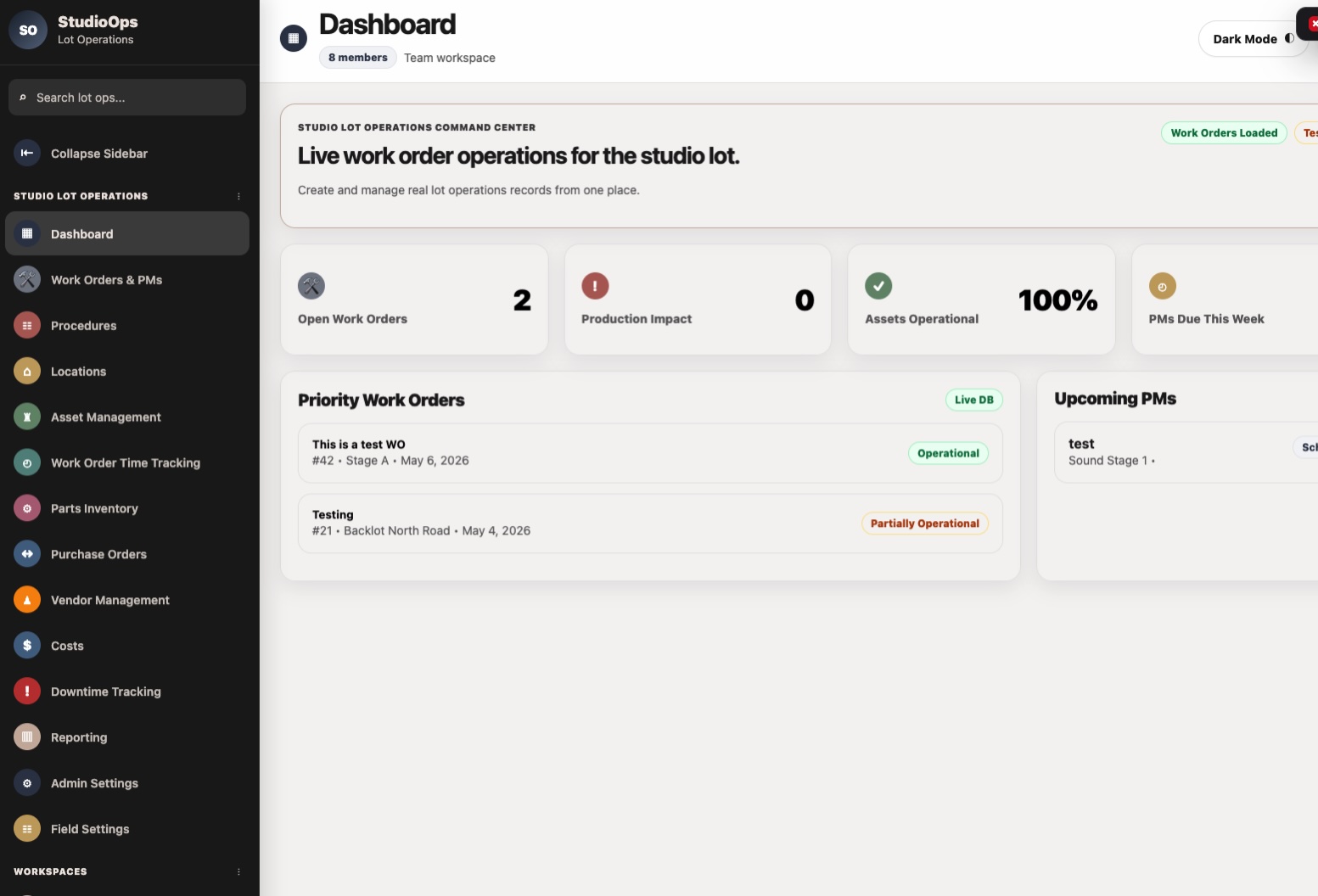
A command center gives leaders a quick way to see what is happening across the operation. Instead of asking multiple people for updates, they can look at the dashboard and understand the current state of the work.
This helps answer questions like:
How many work orders are open? Which ones are overdue? Which locations have the most activity? What assets are causing repeated issues? Which vendors are involved? Are preventive maintenance tasks being completed on time? Where are we seeing downtime? What needs leadership attention?
For operations directors, facility managers, and maintenance leads, this kind of visibility supports better planning and faster decisions.
It also helps leadership understand the workload. Facility teams are often doing more than people realize. A reporting dashboard makes that work visible.
How Studio Facility Commander Helps Centralize Facility Operations
Studio Facility Commander is a lightweight facility operations dashboard built to help teams manage facility work from one central system.
It is designed for teams that need practical visibility without the bloat of oversized enterprise systems. Instead of overwhelming users with unnecessary complexity, Studio Facility Commander focuses on the core tools facility teams need to stay organized.
The dashboard helps manage:
Work orders Locations Assets Vendors Purchase orders Inventory Preventive maintenance schedules Downtime events Work order comments Image uploads Activity history Leadership reporting
For production campuses, studio lots, schools, churches, warehouses, event venues, and small-to-mid-size organizations, this creates a cleaner way to manage daily operations.
Studio Facility Commander works as a practical facility operations dashboard where teams can see the work, assign the work, track the work, and report on the work.
It can function as a facility work order system, a work order dashboard, a maintenance management dashboard, and a central operations view for leaders who need better visibility.
The goal is not to make facility management more complicated. The goal is to make the work easier to manage.
Who the Dashboard Is Built For
Studio Facility Commander is built for teams that manage real spaces, real assets, and real operational needs.
That includes:
Facility managers Operations directors Studio lot managers Maintenance leads Production campuses Schools Churches Warehouses Event venues Small-to-mid-size organizations Teams replacing spreadsheets and email Teams that need cloud-based facility management software without enterprise complexity
It is especially helpful for organizations that have outgrown informal systems but do not want a massive enterprise platform that takes months to configure and train.
For many teams, the right answer is not the biggest system. It is the system people will actually use.
What to Look for in Facility Management Software
When choosing facility management software, it is important to look for practical features that match the way your team works.
A good platform should be easy to use, flexible enough for your operation, and clear enough for both frontline teams and leadership.
Look for software that can support:
Simple work order creation Clear status tracking Assignment and accountability Location-based organization Asset history Preventive maintenance schedules Vendor coordination Inventory or materials tracking Purchase order visibility Photo and comment uploads Activity history Mobile or cloud access Reporting dashboards Maintenance workflow automation
The best facility management dashboard should reduce confusion, not create more of it.
If a system is too complicated, teams may avoid using it. If it is too limited, they may end up going back to spreadsheets. The right system should sit in the middle: structured, useful, and practical.
Final Takeaway
Facility teams do not need more scattered tools. They need one place to manage the work.
A facility management dashboard helps teams centralize work orders, assets, vendors, preventive maintenance, inventory, purchase orders, comments, images, activity history, and reporting. It gives maintenance teams better visibility and gives leaders a clearer view of what is happening across the operation.
For organizations that are tired of managing facility work through spreadsheets, emails, texts, and disconnected tools, Studio Facility Commander offers a more practical path forward.
It gives teams a central command center for facility operations without forcing them into bloated enterprise software.
The result is simple: less chasing, better tracking, clearer accountability, and a stronger way to manage the daily work that keeps facilities running.
FAQ
What is a facility management dashboard?
A facility management dashboard is a centralized system that helps teams manage work orders, assets, vendors, locations, maintenance schedules, inventory, and facility reporting from one place.
What is the difference between facility management software and CMMS software?
Facility management software usually covers a broader range of facility operations, including locations, vendors, inventory, work orders, reporting, and daily operations. CMMS software is often more focused on maintenance management, assets, equipment, and preventive maintenance. Many teams need features from both.
How do facility teams track work orders?
Facility teams can track work orders through a facility work order system or work order management software. This allows them to create requests, assign tasks, set priorities, update statuses, add comments, upload images, and track completion history.
Can facility management software replace spreadsheets?
Yes. For many teams, facility management software can replace spreadsheets by giving them a more structured way to manage work orders, assets, maintenance schedules, vendors, inventory, and reporting.
Why is asset tracking important for facility maintenance?
Asset tracking helps teams understand where equipment and facility assets are located, what condition they are in, when they were last serviced, and whether they are tied to past or current work orders. This supports better maintenance planning and replacement decisions.
What is preventive maintenance in facility management?
Preventive maintenance is planned maintenance performed on a recurring schedule to help reduce breakdowns, improve safety, extend asset life, and prevent larger repair issues.
Who needs a facility operations dashboard?
Facility managers, operations directors, studio lot managers, maintenance leads, schools, churches, warehouses, event venues, production campuses, and small-to-mid-size organizations can all benefit from a facility operations dashboard.
What makes Studio Facility Commander different?
Studio Facility Commander is built to be lightweight, practical, and easier to use than oversized enterprise systems. It centralizes work orders, locations, assets, vendors, purchase orders, inventory, preventive maintenance, downtime events, comments, images, activity history, and leadership reporting in one system.